Book folding vs fore-edge relief: what happens to each leaf?
A word on a book edge can come from folded corners or from paper cut away. The finished silhouette alone does not tell you which instructions to follow.
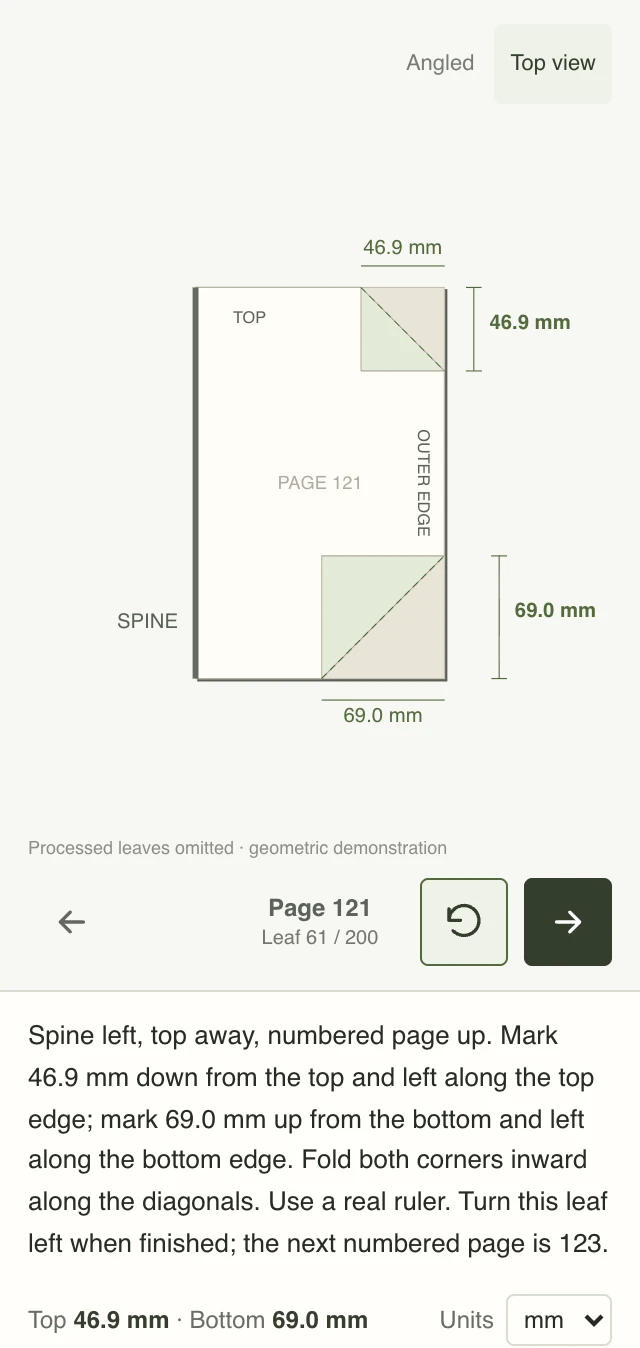
Folding moves paper
Dashed lines show the original edge and creases. Both corners fold inward; the paper stays.
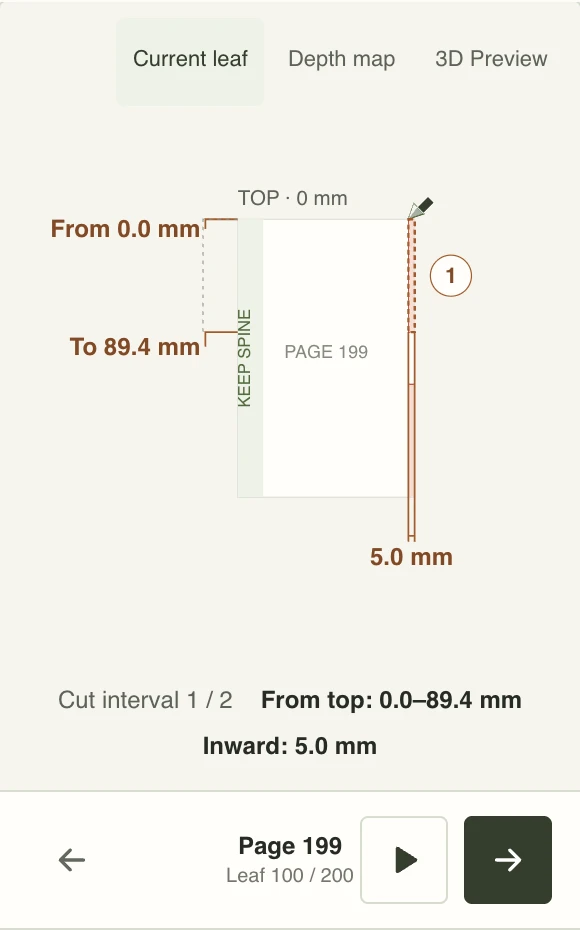
Relief removes paper
Red marks the retained profile. Remove the pale-red outer strips; keep the spine connected.
Both examples use H to explain their workflows, but they are generated by separate algorithms. These screenshots and diagrams are not finished-book photographs or interchangeable templates.
Folding moves paper
In FoldBook’s corner-fold mode, you mark heights on one physical leaf and fold the upper and lower corners inward. The paper remains attached. The guide needs fold marks, crease geometry and a folding sequence; a blank spacer leaf uses a different fold.
Fore-edge relief removes paper
The method discussed here cuts individual leaves inward from the fore-edge, opposite the spine. Each leaf retains a different outer profile. Bring the leaves together and those profiles form a silhouette across the book edge. Raised artwork keeps the dark silhouette and cuts back the surrounding areas; recessed artwork cuts into the dark silhouette instead.
The same dark artwork can mean keep or remove
Choose this intentionally. Convex relief retains the dark H and removes its background; concave removes the dark H instead. The change affects the actual slices. Folding has no equivalent removal mask: its marks tell you how to move paper, not which dark pixels to cut away.
Original input
A black H on white. Choose the effect after choosing the artwork.
Convex · keep artwork
H stays at the original edge; cut back the background.
Concave · cut artwork
Cut back H; the background stays at the original edge.
Retain the original edgeCut inward
At a glance
| Question | Corner folding | Fore-edge relief cutting |
|---|---|---|
| What changes? | Paper position | Amount of retained paper |
| Per-leaf instructions | Upper and lower fold marks | Height intervals and inward cut depths |
| Primary preview | Creases and folded corners | Retained profile and removal regions |
| Can the same pattern serve both? | No: fold marks describe folds | No: cut profiles describe boundaries |
| Leaf without artwork | Can need a quarter-width spacer fold | Leave uncut when no cut intervals are listed |
| Current exports | Folding instruction PDF and local JSON backup | Local JSON backup; no printable relief template |
Retain a connected strip at the spine
Every retained shape must remain connected to the bound part of its leaf. Loose islands will fall away. Our planner only describes cuts reachable from the outer edge and keeps a continuous spine strip. It does not support enclosed internal holes or determine how much paper a particular binding needs.
This workflow is not an instruction to machine the whole closed book. Bulk carving is a different process and may need clamping or reinforcement that this tool does not model. A numeric spine margin alone does not establish structural strength.
The previews need different geometry
A folding preview shows creases and paper rotating around them. A cutting preview shows the retained sheet outline, removal regions and a depth map across the leaves. Folding marks cannot be reused as cutting paths. Our removal animation follows the target outline for illustration, not as an operational cutting technique or machine toolpath. Its millimetre labels describe the original leaf’s height intervals and inward depths. A folding lower-corner measurement starts at the bottom; both relief interval endpoints start at the top. Do not swap these reference points.
What the current relief planner can do
The experimental planner accepts text or a black silhouette in PNG or JPEG format. It produces two depth levels: the original edge and one chosen cut-back depth. One physical leaf has two numbered pages; a 400-page book therefore gets 200 profiles. The artwork is fitted across the leaves, and vertical intervals use 256 samples over the page height.
This is a binary silhouette model, not a multi-depth sculpture reconstructed from a photograph. The depth map spreads leaf indices horizontally for readability; it is not a true-scale render of the paper stack. The 3D preview uses assumed paper thickness and a schematic 60-degree opening with intact covers; real flexing and binding forces are not simulated. Fine details can disappear in sampling.
Before cutting a real book
Start with a simple silhouette and test a few scrap leaves. Keep both covers intact; the guide applies only to numbered inner leaves and is not a printable cutting template. Use a suitable cutting mat between the working leaf and adjacent leaves, keep fingers away from the blade, and leave the protected spine strip intact. If a profile is impractical to cut accurately, simplify the design rather than treating the preview as a guarantee.
Some book-art techniques combine cuts and folds. They need their own instructions; this comparison concerns our corner-fold mode and this outer-edge removal model. It also does not describe fore-edge painting, which adds an image rather than shaping the paper by removal.